Operations
One Calendar, Every Property: Solving the Multi Property Calendar Mess
 Maud NeattJune 25, 20268 min read
If you manage more than a couple of properties, you already know the failure mode. One calendar lives on Airbnb, another on Booking.com, a third on Vrbo, and a fourth — the "real" one — is a spreadsheet or a wall planner that someone updates from memory. The result is predictable: a double booking you find out about from a furious guest, or a changeover day nobody staffed because the booking was buried in a tab you didn't have open.
A multi property calendar fixes the visibility problem at the root. Instead of one calendar per listing per platform, you get one timeline that shows every property's availability and bookings together. This piece is about why that single view matters operationally, how iCal sync ties a channel manager's bookings into it, and how to use it to stop double bookings and missed changeovers.
Why juggling separate calendars breaks down
The trouble isn't any single calendar — each OTA's calendar is fine on its own. The trouble is that there's no single place where they meet.
Every platform shows you its own bookings and nobody else's. Airbnb doesn't know about your Booking.com reservation. Vrbo doesn't know the villa is blocked for an owner stay. So the only complete picture of a property's availability lives in your head, or in a manual log that's only as current as the last time someone remembered to update it.
That works at two or three properties. It stops working somewhere around five, and by ten it's actively dangerous. The math is unforgiving: more listings times more platforms equals more calendars to reconcile, and the reconciliation is manual. Managing that sprawl is one of the hardest parts of scaling from 5 to 20 properties — the bookings aren't the problem, the fragmentation is.
Two specific failures come out of this:
- Double bookings. A guest books your villa direct while the same week is still showing as available on Booking.com, because nobody blocked it there. Now you're cancelling on someone, eating a penalty, and taking a review hit.
- Missed changeovers. A check-out and a same-day check-in at one property is normal. Three of them on the same Saturday across different properties is a staffing crisis — but only if you can see it coming. On separate calendars, you can't.
Both failures share a cause: the information existed, but not in one place, in time to act on it.
What a single multi property calendar actually gives you
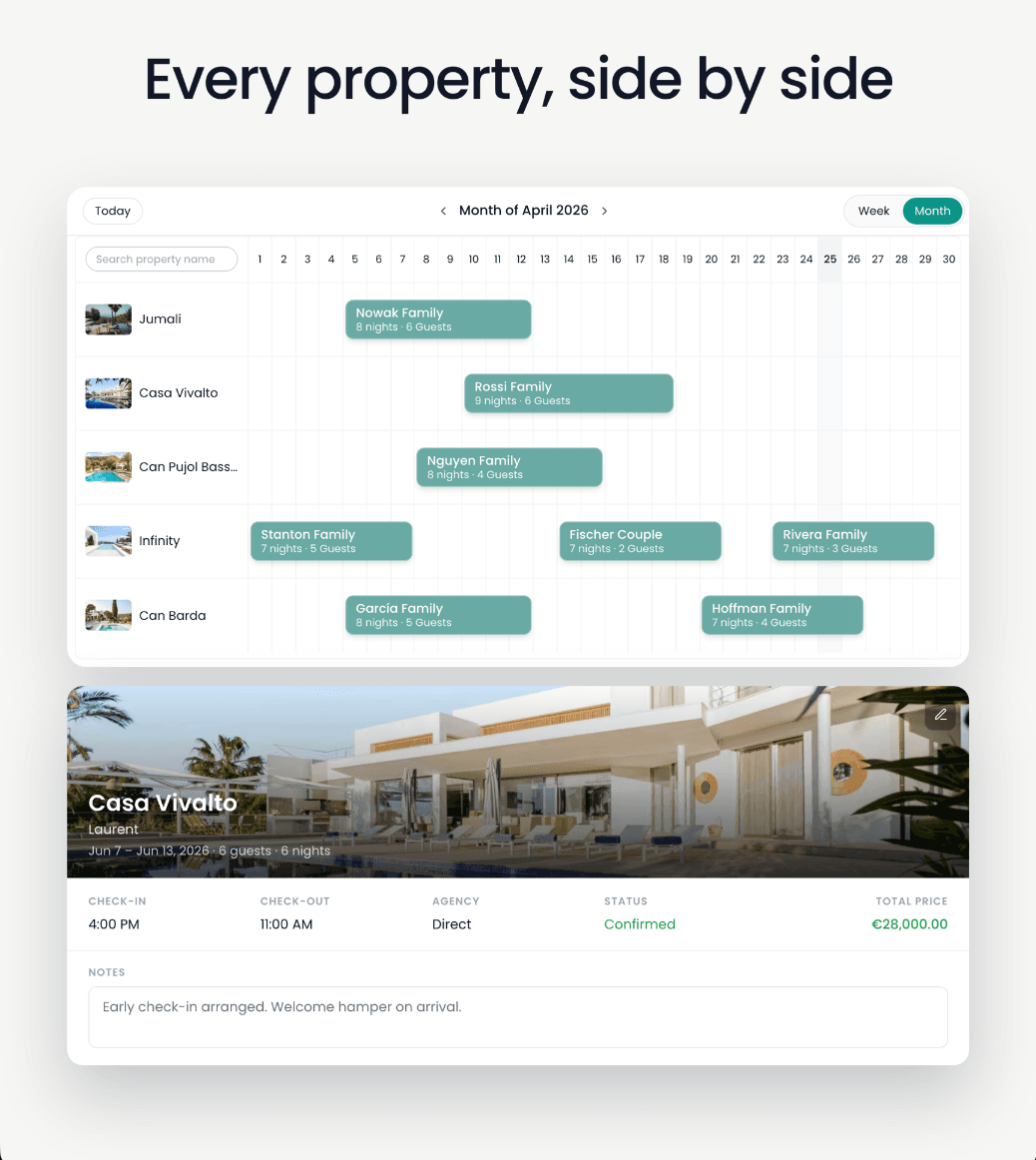
Consolidation is the whole point. A multi property calendar takes the bookings scattered across every platform and every listing and lays them on one timeline.
The immediate win is portfolio-level occupancy at a glance. You can see which properties are full next month and which have gaps, without opening ten tabs. That's useful for revenue, but it's essential for operations — because operations runs on the overlaps between bookings, not the bookings themselves.
Changeover day is the clearest example. A turnover is the work between a check-out and the next check-in: cleaning, laundry, restocking, a maintenance check, sometimes a key handover. When all your bookings sit on one calendar, the changeovers line up visually. You can immediately see the Saturday where four properties turn over at once and plan staff around it — instead of discovering it on the morning itself. The handover problem gets dramatically easier when the day is visible a week out.
A unified calendar also gives you a single source of truth for "is this property free?" — which is the question behind every direct booking enquiry, every owner stay request, and every maintenance window. Answer it from one place and you stop second-guessing yourself.
How iCal sync ties it together
The mechanism that makes a single calendar possible across platforms is iCal — the same calendar-sharing standard your phone uses.
Every major OTA can publish a listing's calendar as an iCal feed: a URL that broadcasts that property's blocked and booked dates. It carries availability, not guest names, rates, or payout details — just "these dates are taken." Any calendar that subscribes to that feed sees those dates appear as blocked.
So the pattern is simple. Your operational calendar imports the iCal feed from each listing on each platform. When a guest books on Booking.com, that reservation shows up in the feed, and on the next refresh it appears as a blocked date in your unified view — and, if you've wired it up, as a block on your other platforms too, so they stop selling those nights.
Here's where it connects to distribution. If you run a channel manager — the tool that pushes rates and availability out to the OTAs and pulls reservations back — its bookings flow into your operational calendar the same way: through iCal. The channel manager owns distribution across platforms. The multi property calendar owns the operational picture: who's arriving, who's leaving, what needs cleaning, who's staffing it. One handles the selling; the other handles the doing. They're complementary, not competing — which is worth keeping in mind when you compare a calendar tool against the best property management software for short-term rentals.
One honest caveat: iCal feeds refresh on a schedule, not instantly. The interval is usually short, but it's not zero. For properties that are heavily cross-listed and book fast, that small lag is exactly why serious operators pair a unified calendar with a channel manager's real-time sync rather than relying on iCal alone.
Calendar view vs. channel manager — what each is for
It's easy to conflate these because they both touch bookings. They do different jobs.
| Multi property calendar | Channel manager | |
|---|---|---|
| Primary job | Show all bookings in one operational view | Push availability and rates to OTAs, pull reservations back |
| Direction of sync | Imports (and can export) via iCal | Two-way, near real-time, API-level |
| What it's optimised for | Day-to-day operations and staffing | Distribution and avoiding oversells |
| Carries guest/payment data | No — dates only | Yes |
| Who relies on it | Cleaners, staff, owners, the manager | The booking/revenue side |
The takeaway: a channel manager keeps your listings from overselling each other. A multi property calendar keeps your operation from falling apart around the bookings you've taken. Most growing portfolios need both, and they sit at different layers of the stack.
Avoiding double bookings and missed changeovers in practice
A single calendar is the tool. Using it well is a habit. A few practices that matter:
- Subscribe every listing's feed, both directions. Import each platform's iCal into your calendar, and export your calendar's blocks back to each platform so a booking on one channel closes the dates on the others. One-way import alone still leaves you exposed to oversells.
- Keep direct and owner bookings on the same calendar. A double booking is just as painful when the conflicting block is an owner stay or a direct enquiry. If it's not on the unified calendar, it doesn't exist as far as the system is concerned — so put it there.
- Read the calendar for overlaps, not just bookings. Scan forward specifically for changeover clusters: days where multiple properties turn over together. Those are your staffing pinch points, and they're only visible when everything shares a timeline.
- Treat the unified view as the source of truth. When the calendar and your memory disagree, the calendar wins. The whole point of consolidating was to stop relying on memory.
None of this requires heroics. It requires one calendar that everything feeds into, and the discipline to check it before you say yes to a booking or a day off.
Where Recal fits
Recal is the operations layer that runs alongside whatever you use to distribute. It isn't a channel manager and never will be — if you have one, keep it. What Recal gives you is the single multi property calendar that consolidates every listing into one operational view, with iCal import and export so your channel manager's bookings, your direct bookings, and your owner stays all land on the same timeline.
From there, the changeovers, the cleaning tasks, the staff coordination, and the owner reporting all hang off bookings you can actually see — across summer villas, ski chalets, short-term rentals, or a mixed portfolio. The booking happens wherever it happens. The work around it happens in one place.
That's the shift a multi property calendar makes: from reconciling a dozen calendars after the fact, to running your whole portfolio from one.
Frequently asked questions
What is a multi property calendar?
A multi property calendar is a single view that shows availability and bookings for several listings at once, instead of one calendar per property. It pulls reservations from each booking channel — usually via iCal — so you can see your whole portfolio's occupancy in one place rather than checking each platform separately.
How does iCal sync keep multiple property calendars in one place?
Each listing on Airbnb, Booking.com or Vrbo exposes an iCal feed — a URL that publishes its blocked and booked dates. A multi property calendar subscribes to those feeds and refreshes them on a schedule, so a reservation made on one platform appears as a blocked date everywhere that imports the feed. It moves dates, not guest details, rates or payouts.
Does a multi property calendar stop double bookings?
It reduces the risk sharply but doesn't eliminate it. iCal feeds refresh periodically rather than instantly, so a tight gap between two near-simultaneous bookings can still slip through. A unified calendar plus a channel manager for true real-time sync is the safest combination for heavily cross-listed properties.
Is a multi property calendar the same as a channel manager?
No. A channel manager actively pushes availability and rates out to the OTAs and pulls reservations back in near real time. A multi property calendar is an operational view that consolidates what's already booked. Many managers run both — the channel manager handles distribution, the calendar handles the day-to-day work around each booking.
Can I see changeovers across all properties on one calendar?
Yes — that's one of the main reasons to consolidate. When every booking sits on the same timeline, the check-out/check-in overlaps that drive cleaning and turnover work become visible at a glance, so you can spot the day three properties all change over at once before it becomes a staffing problem.