Software
What channel managers don't do (and what to use alongside them)
 James JordanMay 25, 20268 min read
If you've ever read a glowing review of Hostaway, Guesty, Lodgify or Smoobu and then spent six months actually using one, you've probably felt the same gap: this is excellent at the thing it does, and there's a lot it doesn't do.
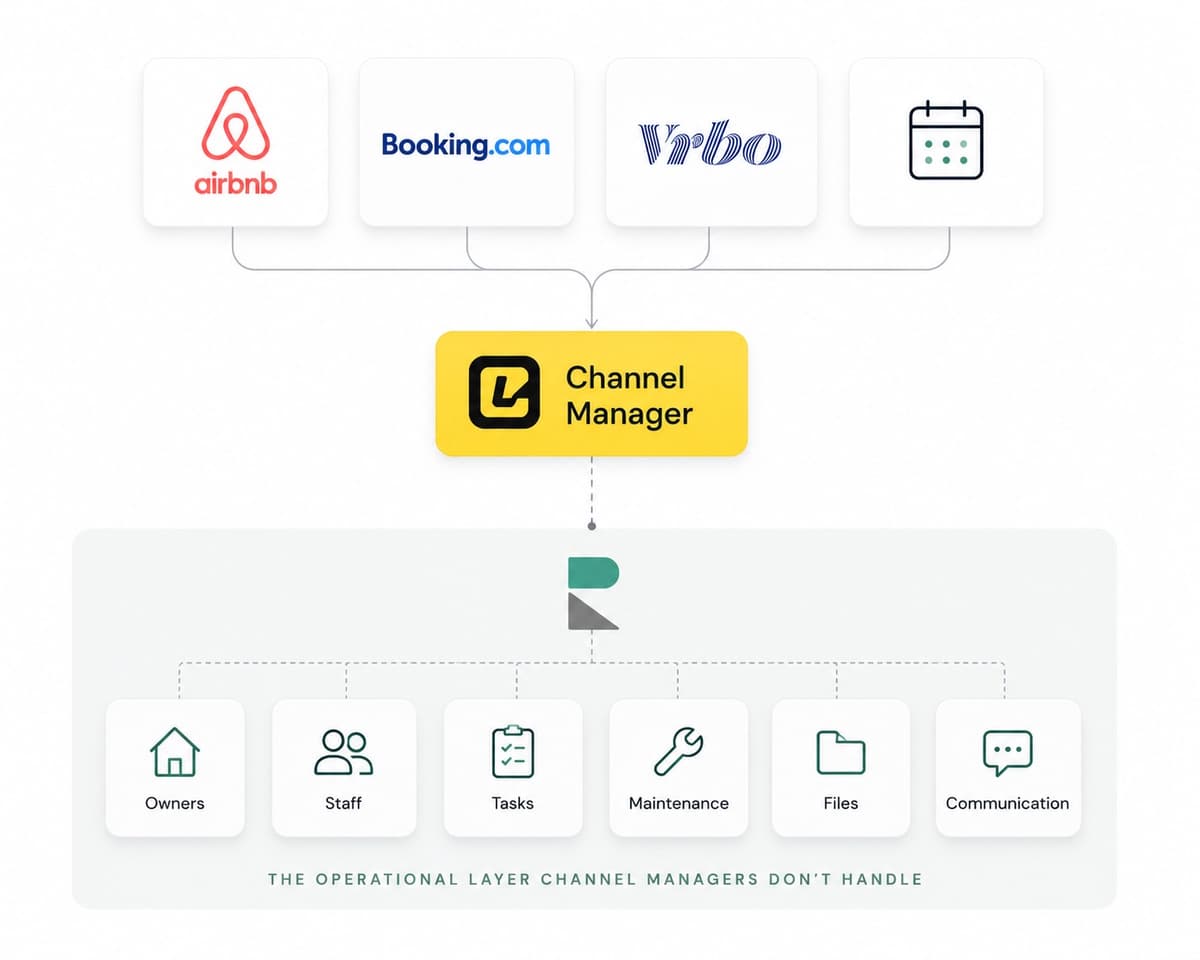
That gap isn't a flaw in the software. Channel managers are built around one specific job — distributing your inventory to OTAs and pulling reservations back — and they're typically very good at it. The gap is structural. The job ends roughly where the OTA pipeline ends. Everything that happens around the booking, before the booking, after the booking, between bookings, between staff, between properties — that's not their problem.
For solo hosts with one or two properties, this is fine. The channel manager + Airbnb + a cleaner is the whole operation.
For anyone past that, the gap becomes the operation. Here's what falls into it.
What a channel manager actually does
To define the gap, we have to be precise about the job.
Channel manager core jobs:
- Push availability and rates to OTAs (Airbnb, Booking.com, Vrbo, Google Vacation Rentals)
- Pull reservations from OTAs back into a unified calendar
- Block conflicting calendars when a booking comes in (the "no double-bookings" job)
- Sometimes: automated guest messaging templates
- Sometimes: pricing automation
- Sometimes: a basic owner statement module (usually thin)
This is a real, hard job. OTAs change their APIs without notice; rate sync glitches cost real money; calendar accuracy matters every single day. Don't underestimate it.
But it's not the whole job. Here's what isn't in that list.
Gap 1: Multi-property operational view
A channel manager shows you the OTA picture — listings, reservations, occupancy, revenue. It rarely shows you the operational picture: who's where, what's happening today, what's overdue, what needs your attention this morning before guests arrive at 4pm.
This sounds like a minor UI issue. It isn't. At 5+ properties, "what's happening today across the whole operation" becomes the most important question you ask yourself every morning, and most channel managers can't answer it. They can tell you reservation #4582 is arriving today at 16:00. They can't tell you that the cleaner at Property B finished an hour ago, the gardener at Property F still hasn't shown up, and the gas certificate at Property D expires next week.
That picture lives somewhere else. For most operations, that somewhere else is a whiteboard, a notebook, or a Google Doc the founder updates manually every morning.
Gap 2: Owner reporting
If you manage other people's properties, you owe them visibility. Owners want to know how their property is performing, when it was booked, who stayed, what came in, what went out, what needs maintenance.
Channel managers almost universally treat owner reporting as an afterthought. The reports they generate are designed for the operator's view (revenue per listing, ADR, RevPAR), not the owner's view (my property, this month, how did it do, what's next). The output is usually:
- A CSV export the operator manipulates manually
- A basic PDF generator that produces something the owner doesn't read
- A "portal" that's actually the operator's interface with permissions filtered down, which feels alien to a non-tech owner
The result is that owner reporting gets done outside the channel manager — in Excel, in Notion, in custom PDFs, in long email updates. For a 5-property operation that's tolerable. For a 20-property operation it's a part-time job.
Gap 3: Staff coordination
Your channel manager knows who's booked. It does not know:
- Which cleaner is at which property on Saturday
- Whether the gardener has been to the second house this month
- That the new maintenance person needs access to the back gate code at Property G
- That last Tuesday's check-in had a complaint about the dishwasher and you need to follow up
This is where the WhatsApp threads come in. Every operation past 3-4 properties has a sprawl of WhatsApp groups: cleaners, maintenance, owners, co-hosts, sometimes one per property. Information disappears into chat history. New staff don't have context. Things get missed.
Channel managers don't model staff as first-class entities. Some have "user accounts" with role-based permissions, but they're built for the operator's team to use the same software — not for coordinating who's physically doing what, where, today.
Gap 4: Internal team communication
Related to Gap 3, but different. Gap 3 is about scheduling and accountability. Gap 4 is about the conversation between team members — the equivalent of a Slack channel, but scoped to a property or a booking.
Channel managers handle the manager-to-guest conversation. They almost never handle the manager-to-owner-to-co-host-to-staff conversation, which is where most of the actual work happens.
Example: a guest reports a broken AC unit. The manager needs to:
- Log the issue
- Notify the maintenance contact
- Update the owner (so they know about the cost coming)
- Decide whether to compensate the guest
- Check that maintenance actually came
- Close the loop with the owner ("fixed, here's the invoice")
That's five interactions, three different audiences, one piece of property information. In most operations, this happens across WhatsApp, email, and the operator's memory. The channel manager records that the guest stayed and left a review. It doesn't record any of the rest.
Gap 5: Property knowledge management
Every property has a body of knowledge that grows over time:
- Where the boiler reset switch is
- The gate code that changes annually
- Which gardener handles the pool
- The owner's preferred contractor for plumbing
- Last year's gas certificate (when does it expire?)
- Photos of the meter readings for utility transfers
- The Wi-Fi password and which router has been replaced
This knowledge sits in operators' heads, in Dropbox folders nobody remembers the structure of, in pinned WhatsApp messages, in printed binders at the property. When the operator goes on holiday or leaves, the knowledge goes with them.
Channel managers don't model this. Some have a "property notes" field. Most operators outgrow it within a year.
How operations usually fill these gaps
They don't, often. They live with the gaps until something breaks badly enough that the operator does something about it.
When the operator does do something, the typical sequence is:
- WhatsApp + Sheets phase — try to make existing tools cover the gaps. Works at 1-3 properties.
- Tool sprawl phase — Trello for tasks, Notion for property notes, Google Sheets for owner reports, separate WhatsApp groups for different staff. Works at 3-8 properties, falls apart at 10+.
- Operations platform phase — add a tool that's purpose-built for the layer the channel manager doesn't cover. This is the layer Recal is built for.
The third phase is increasingly common as operators realise the gaps aren't going to close themselves and the all-in-one channel managers (Guesty, Hostaway full tier) don't actually cover them well either — they extend the channel manager to add light operational features, which works for some teams and not for others.
What the proper "second tool" looks like
If you reach the third phase, the operations platform you want has roughly these capabilities:
- Multi-property calendar with operational layers — bookings, tasks, cleaning, maintenance all on one timeline
- Owner portals or accounts — owners can see their own properties without you sending screenshots
- Staff coordination — task assignment, scoped property access, role-based permissions
- Internal messaging — team-side conversations, not just guest-side templates
- Damage tracking — photo evidence, one-click conversion to a task, cost attribution
- Property knowledge — notes, files, contacts pinned to each property
- iCal sync (one-way ingest) — pulls reservations from your channel manager into the operations calendar
Recal does all of these and explicitly doesn't do channel management — we wrote about why. The point isn't that everyone needs Recal; the point is that whatever you use should be designed for the operations layer, not have operations layered on top of a distribution tool.
What this means for the "all-in-one" pitch
When Guesty or Hostaway tell you their platform does both, they're not lying — they technically do. But "does both" and "does both well" are different claims.
Most operators who try the all-in-one route at small-to-medium scale end up either:
- Using the channel manager fully and the operations side barely at all (then asking themselves why they're paying enterprise pricing)
- Adding a separate operations tool anyway when the in-platform operations features prove too thin
- Tolerating the gaps and running them through WhatsApp and Sheets in parallel
The two-tool stack — modest channel manager + dedicated operations platform — costs less and works better for most operations past 5 properties. The all-in-one stack works for enterprise-scale operations that need the full distribution and analytics suite and have the team to use it.
A simple test
If you're currently using a channel manager and reading this article wondering "is this me," try this exercise. Open your channel manager. Find:
- What your cleaner needs to do at Property X tomorrow morning
- The last time the boiler at Property Y was serviced
- The owner's current cost-share preference for emergency repairs at Property Z
- The internal note about why guest John Smith is no longer welcome at any of your properties
If your channel manager can't surface any of those in under 30 seconds, the gap is real and you've been working around it. The question is whether the work-around is costing you enough to justify a second tool.
For most operators past five properties, the answer is yes.
Related reading: scaling from 5 to 20 properties operationally covers what specifically breaks at each growth threshold, and property management software for Airbnb hosts walks the same logic from the host's side of the table.
Frequently asked questions
What does a channel manager actually do?
A channel manager pushes availability and rates to OTAs like Airbnb, Booking.com and Vrbo, and pulls reservations back into a unified calendar. It blocks conflicting calendars when a booking comes in, which is the no-double-bookings job. Some also add automated guest messaging templates, pricing automation, or a basic owner statement module.
What does a channel manager not do?
It does not give you a multi-property operational view of what is happening today, it does not handle owner reporting well, and it does not coordinate staff or model them as first-class entities. It also does not handle internal team conversations between managers, owners, co-hosts and staff, and it does not manage the body of knowledge each property accumulates over time. Those gaps are structural, because the job ends roughly where the OTA pipeline ends.
Why is a channel manager enough for a solo host but not for a larger operation?
For a host with one or two properties, the channel manager plus Airbnb plus a cleaner is the whole operation, so the gaps barely show. Past that point the gaps become the operation itself, because questions like what is happening today across every property start to matter every morning. The channel manager cannot answer those questions.
Do all-in-one platforms like Guesty or Hostaway cover the operations layer?
They technically do both distribution and operations, but does both and does both well are different claims. They tend to extend the channel manager with light operational features, which works for some teams and not for others. Many operators at small-to-medium scale end up barely using the operations side, adding a separate operations tool anyway, or running the gaps through WhatsApp and spreadsheets in parallel.
What should a dedicated operations platform include?
It should offer a multi-property calendar with operational layers for bookings, tasks, cleaning and maintenance, plus owner portals, staff coordination with scoped property access, and internal team messaging. It should also include damage tracking with photo evidence, property knowledge in the form of notes, files and contacts, and one-way iCal ingest that pulls reservations from your channel manager. The point is that it should be designed for the operations layer rather than have operations layered on top of a distribution tool.
How do operators usually fill these gaps before getting a dedicated tool?
Many do not fill them at all and live with the gaps until something breaks. The typical sequence is a WhatsApp and spreadsheets phase that works at one to three properties, then a tool sprawl phase using Trello, Notion and Google Sheets that falls apart around ten properties, and finally adding a platform built for the layer the channel manager does not cover. A modest channel manager plus a dedicated operations platform tends to cost less and work better for most operations past five properties.