Blog/Software
Notion for property management: a workspace that works, and where it stops
 James Jordan · Updated November 14, 2026 · 9 min read
We make Recal · How we compare

On this page+
Short answer
Notion makes a very good house manual and a decent work log for a couple of homes — the setup is below. It can't read your Airbnb or Booking.com calendars, though, and it doesn't know two stays can't overlap. For a real portfolio, a property tool such as Recal does that part out of the box.
Notion is where a lot of rental managers start writing things down: the Wi-Fi password, how the pool pump works, who the plumber is. Search its template gallery and you'll find property management hubs and Airbnb host templates made by the community. So it's natural to ask whether Notion can run the whole operation.
It can run part of one. Here's a workspace that works, the shortlist, and where Notion stops being the right tool.
The shortlist:
- Recal — best for running rentals with a team and owners (we make it).
- Notion, set up as below — best for the house manual and a small portfolio's work log.
- A shared spreadsheet — best for one home and no team.
The workspace, step by step
Build four databases and link them with relations.
1. Properties. One page per home. This is where Notion shines: codes, Wi-Fi, how things work, contacts, documents, photos. Mark what guests may see and what stays internal.
2. Stays. One entry per booking, related to a property: guest, check-in, check-out, platform, guests, status. Add a calendar view on the dates and a board view by status.
3. Changeovers. One entry per turnover, related to the stay and the property: time out, time in, cleaner, status, and what's different this time.
4. Maintenance. One entry per job or recurring service: property, what, who, due date, status, cost.
The Changeovers database, viewed as a table for a Saturday:
| Property | Out | In | Cleaner | Status | This time |
|---|---|---|---|---|---|
| Casa Verdi | 10:00 | 16:00 | Ana | Done | Hot tub cover was left open |
| Villa Sa Punta | 11:00 | 17:00 | Luis + Marta | In progress | Early arrival requested, ask before 13:00 |
| Can Blau | 10:00 | — | Ana | Not started | No arrival: deep clean the oven |
On a paid plan, add database automations:
- When a stay is added, create the changeover for its check-out date.
- When a changeover is marked Done, notify the arrival person in Notion or Slack.
Then give each person a filtered view: a cleaner's "My changeovers this week", a manager's "Everything not done by Friday". On the phone app you can choose pages to keep offline, which helps in villas with poor signal.
Where it stops
Notion is a flexible document and database tool. It doesn't know what a booking is, and that shows up quickly:
- No calendar import from Airbnb or Booking.com. A Notion database has a calendar view, but we found no built-in way to import a booking platform's calendar link into it. Notion Calendar can't subscribe to a calendar link from inside the app either; you'd subscribe in Google Calendar first, and it still wouldn't land in your Stays database. Third-party tools fill the gap, each with its own refresh delay.
- Clashes aren't caught. A database will show two stays on the same house on the same night without complaint.
- Owners get pages, not a view of their money. You can invite an owner as a free guest to a page, but their bookings, income and statements are yours to build and keep current.
- Someone has to be the integration. Every booking typed in, every cancellation remembered, every relation linked. It works until the busy weeks, which is when it matters.
- Structure drifts. A workspace anyone can edit grows a fourth version of the cleaning checklist. That's Notion's strength for notes and its weakness for operations.
The same job in Recal
Recal starts from the property and the stay, so it covers the gaps above without building anything:
- Calendars come in on their own. Each platform's calendar link is imported and refreshed every hour, and an overlap is held as a conflict for you to resolve. How calendars work.
- Each property has an Info tab — codes, how things work, contacts, documents — and you choose what guests see. Each booking's guest page reads from it.
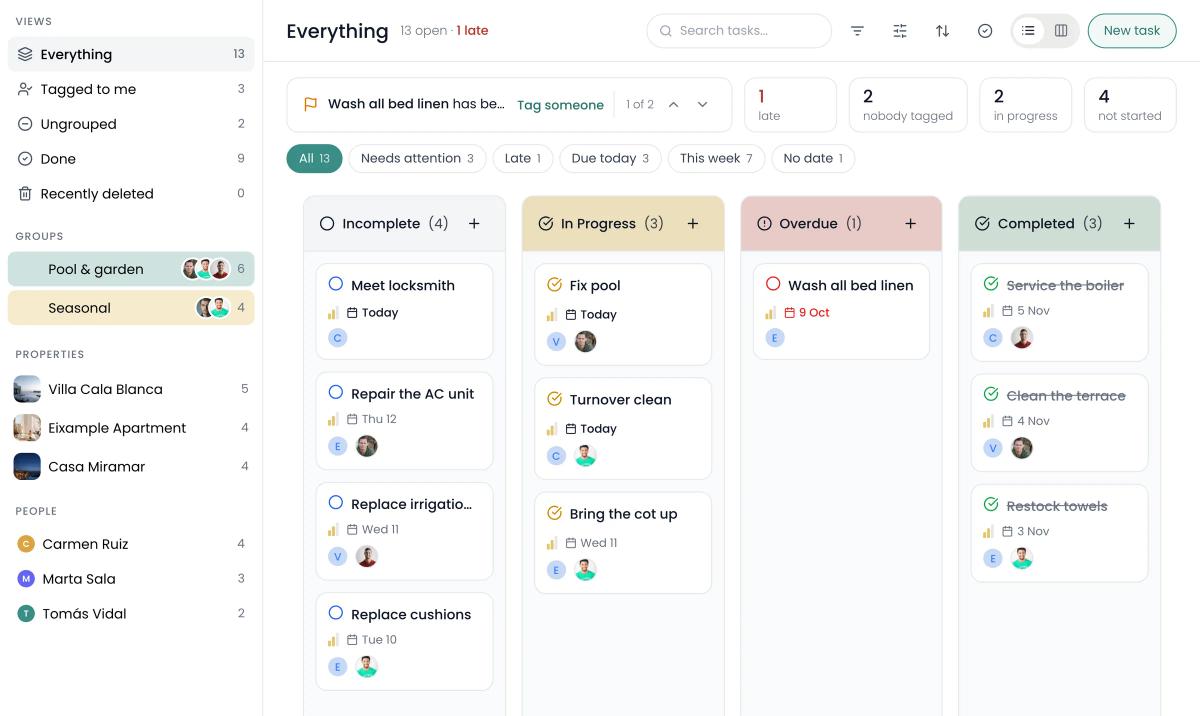
- Changeovers are tasks, assigned to the cleaner, on their phone; staff see only their own properties. How tasks work.
- Owners get their own page with bookings, revenue and occupancy, and a statement each month. The owner page.
What it costs
Notion prices per member; Recal prices per plan, with listings and staff included. Notion's figures are from its pricing page on 14 November 2026 — check whether its toggle shows monthly or annual billing when you compare. You need a paid plan for database automations.
| Your operation | Notion Plus | Recal |
|---|---|---|
| 3 homes, 2 people | about €19/month | €19/month (Host: 3 listings, 3 staff) |
| 10 homes, 5 people | about €47.50/month | €49/month (Manager: 15 listings, 5 staff) |
| 25 homes, 10 people | about €95/month | €99/month (Business: 40 listings, unlimited staff) |
On price, the two are close. The difference is what you get for it: Notion gives you the blocks, and the setup, the calendar bridge and the upkeep are yours. Recal's plans have no commission on bookings, and extra listings are €5 a month each.
When Notion is enough
Stay on Notion if you have one to three homes, you enjoy keeping a tidy workspace, and the bookings database won't fall behind. Many managers keep Notion for internal notes even after they move the operation elsewhere, and that's a perfectly good split.
The time to move is when the workspace has become a second job: re-typing bookings, chasing which changeover is current, building owner updates by hand. We look at the same question for other tools in Monday.com for property management and Trello for property management.
Sources: notion.com pricing page and help centre (database automations, Notion Calendar, offline pages), checked 14 November 2026. Prices change; confirm on notion.com before you decide.
Questions
Can you use Notion for property management?+
Yes, for a small portfolio. Four linked databases — properties, stays, changeovers and maintenance — make a good house manual and work log for one to three homes. Notion can't read your Airbnb or Booking.com calendar, though, so bookings have to be entered by hand or through a third-party tool.
Is there a Notion template for property management?+
Yes, several, made by the community and listed in Notion's template gallery, including property management hubs and Airbnb host templates. They give you the databases; the work of keeping bookings, cleaners and owners up to date is still yours.
How much does Notion cost for a property manager?+
Notion has a free plan, and its Plus plan is about €9.50 per member per month, with Business at about €19.50. You need a paid plan for database automations. Guests, such as an owner invited to a single page, are free.
Can Notion sync with Airbnb?+
Not directly. Notion's databases have a calendar view, but there's no built-in way to import an Airbnb or Booking.com calendar link into one. Notion Calendar can't subscribe to a calendar link from inside the app either; you'd subscribe in Google Calendar first. Third-party tools exist to bridge the gap.
When is Notion enough for vacation rentals?+
When you have one to three homes, you like writing things down, and someone is happy to keep the bookings database up to date by hand. Once bookings come from several platforms and a team is working from it on phones, a property tool saves more time than it costs.
Keep reading
Software
Trello for property management: a board that works, and where it stops

Software
Monday.com for property management: a setup that works, and where it stops

Software
Hostaway alternatives: 5 options compared, with prices